
Protecting Your Applicants: MuniCollab’s New Redaction Tool Fights Back Against Planning Board Scams
Protect Applicant Information with MuniCollab’s New Redaction Tool
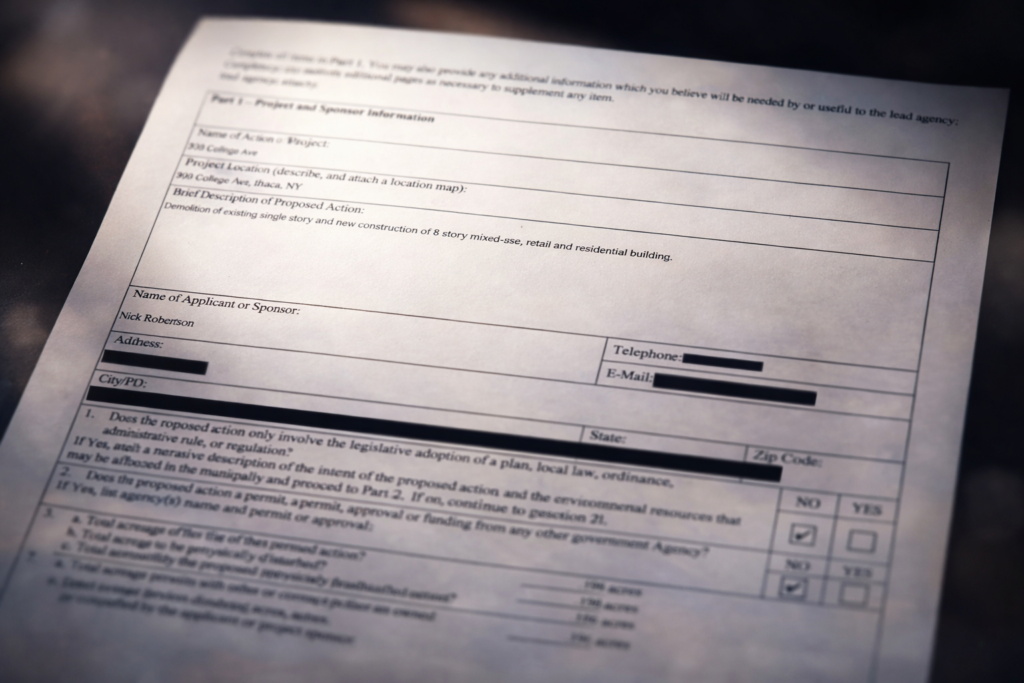
A nationwide scam has been facing planning board applicants and causing confusion across the United States. This scam targets Planning and Zoning Board applicants with fake invoices for application fees, soliciting payment via wire transfer. In most cases those perpetuating the scam are obtaining the email address of the applicant from PDFs published on the municipal website, such as the project application form.
The Solution: Intelligent, Effortless Redaction
While planning documents need to be publicly accessible, applicants’ personal contact information shouldn’t be made publicly available on the internet. This is exactly the kind of problem MuniCollab was built to solve—making municipal processes more efficient and transparent while protecting the people who participate in them.
We’ve built a new redaction tool that makes it simple to protect sensitive information while maintaining the transparency that’s essential to the planning process. Our redaction tool, powered by AI, addresses the core vulnerability: it makes it effortless to remove applicant contact information from public-facing documents while maintaining the transparency that’s essential to the planning process.
The system maintains two versions of every redacted document: the original (accessible only to authorized users) and the redacted version (what the public sees). This means your staff always has access to complete information for legitimate municipal business, while protecting applicant privacy in public-facing documents.
Why This Tool Matters Now
Traditional approaches to this problem are inadequate. Some municipalities have tried:
- Manual redaction with PDF editors: Time-consuming, inconsistent, and error-prone. Staff need to download every file and open in Adobe Acrobat (or similar software), then manually identify information that requires redaction, export the redact version and then upload it to its public destination.
- Restricting public access entirely: This solves the privacy problem but creates a transparency problem. Residents have a right to see what’s being proposed in their communities – an integral part of the, which defeats the purpose of public review process.
- Redacting nothing and hoping for the best: As the recent wave of scams demonstrates, this isn’t a viable strategy.
What municipalities need is a system that’s intelligent enough to identify sensitive information automatically, simple enough that staff can use it without extensive training, and secure enough that redacted information stays redacted.
How MuniCollab’s Approach Is Different
We designed the redaction tool with three core principles: automation, security, and control.
Intelligent Automation
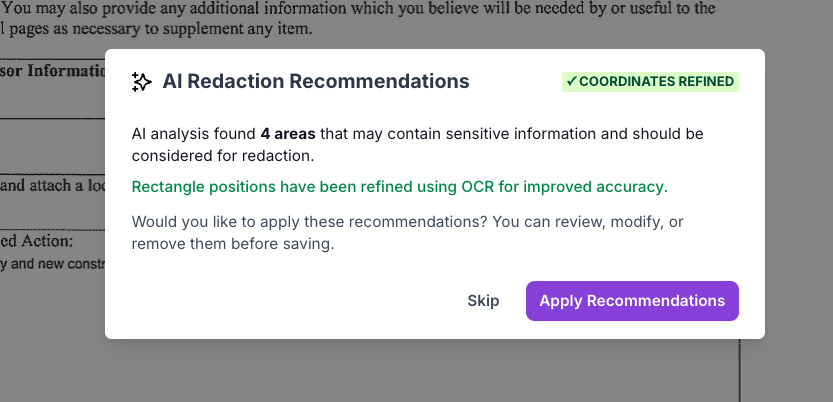
PDF files uploaded to MuniCollab are automatically scanned and analyzed to identify patterns that typically represent sensitive information: email addresses, phone numbers, and mailing addresses. These aren’t hard-coded rules—the system actually understands the context of planning documents and can distinguish between, say, a municipal building address that should remain visible and an applicant’s home address that should be protected.
Authorized users will see intelligent suggestions the moment you click the “Redact” button. Review the recommendations, adjust if needed, and apply them all with one click. The entire process takes less than 30 seconds.
Permanent, Secure Protection
When you redact information in MuniCollab, we convert the redacted page(s) of the PDF to an image format on our servers. This isn’t just a cosmetic change—it fundamentally alters how the document is stored and displayed.
Some redaction tools work by drawing black boxes over text while leaving the underlying data intact. If not used perfectly, someone could potentially copy the “redacted” text or manipulate the PDF to reveal what’s underneath. That’s not a theoretical concern—it’s happened with high-profile document releases at the highest levels of government.
Our approach eliminates this vulnerability entirely. Once you redact information in MuniCollab, that information is permanently removed from the public version of the document. There’s no hidden layer to expose, no metadata to extract, no text to copy from underneath the redaction. The public sees an image where sensitive information has been permanently obscured.
Complete Control
Automation is valuable, but municipalities need the final say on what gets redacted. Our manual redaction interface enables the admin to make modifications to the AI-powered recommendations: drag to select any area you want to protect, resize or reposition the redaction box, and double-click to remove any redaction you don’t want.
Taking Action to Protect Your Applicants
The scammers targeting planning board applicants aren’t going away. They’ve found a systematic vulnerability: publicly accessible contact information combined with people anxious about application approvals. But the solution doesn’t require choosing between transparency and privacy.
MuniCollab’s redaction tool delivers both—making planning documents accessible to the public while protecting the personal information of the people who participate in the process. For municipalities already using MuniCollab, the redaction tool is available immediately at no additional cost. For planning departments evaluating how to address this vulnerability, we are here to help.
Whether you’re dealing with this scam in your jurisdiction or simply want to implement better privacy protections for applicants, our team can demonstrate how the redaction tool works in practice and help you develop policies for consistent implementation.
See Our Redaction Tool in Action
Schedule a demonstration to see how AI-powered redaction can protect your applicants in seconds while maintaining the transparency your community expects. Click here to schedule a demo.
